
You can already see visits from ChatGPT, Gemini, Perplexity and other AI assistants in your analytics. But a report only shows the visits whose source survived. If the app did not pass a referrer, or the person copied your address by hand, the visit can land in Direct. So the honest figure is a confirmed lower bound of AI traffic, and the quality of those visits is worth checking every month.
Below I go through two tools. In GA4, I start with the built-in AI Assistant channel. In Microsoft Clarity, I use its AIPlatform channel as a second view with recordings behind it. I also cover UTM tags and the data you should not mix: brand visibility in answers, human clicks and requests from AI crawlers. I checked the report names and rules against the official help pages on September 23, 2026.
What exactly can you track as AI traffic?
AI traffic in web analytics starts with a visit to your site. Someone gets an answer in ChatGPT or another assistant, clicks a link, and GA4 or Clarity records the page view. If a referrer came with the click, the tool can tie the visit to the assistant's domain. If the link carries UTM tags, the tags take priority.
This is not the same as brand visibility in AI answers. A brand can appear in an answer without a link, a link can go unclicked, and a visit can come later through a separate branded search. Mentions need a different method, which I describe in my guide on how to check brand visibility in AI.
| What happened | Where to find the data | Does it count as a visit? |
|---|---|---|
| The brand was mentioned, no link | AI answer monitoring | No |
| The answer had a link, nobody clicked it | The answer itself or citation monitoring | No |
| A user clicked the link and the source survived | GA4 and Microsoft Clarity | Yes |
| An AI bot requested the page | Server logs and bot reports | No, it is not a human visit |
Mentions, citations and traffic answer different questions. This guide is about real human visits and what those people do on your site.
How does an AI visit get into your analytics?
When a page opens, the browser can pass the address of the previous page in the referrer field. Your analytics matches that signal against its own source and channel rules. If it recognizes the domain, GA4 can put the session in the AI Assistant channel, and Clarity in AIPlatform. If the referrer is lost, the visit often ends up in Direct.
UTM tags work differently. They are written into the link itself and usually take priority over the referrer. But you can only add them where you control the URL: a link in your own AI chatbot, a partner placement or an answer from your company's assistant. You cannot go back and put UTM tags on an ordinary link that ChatGPT built by itself.
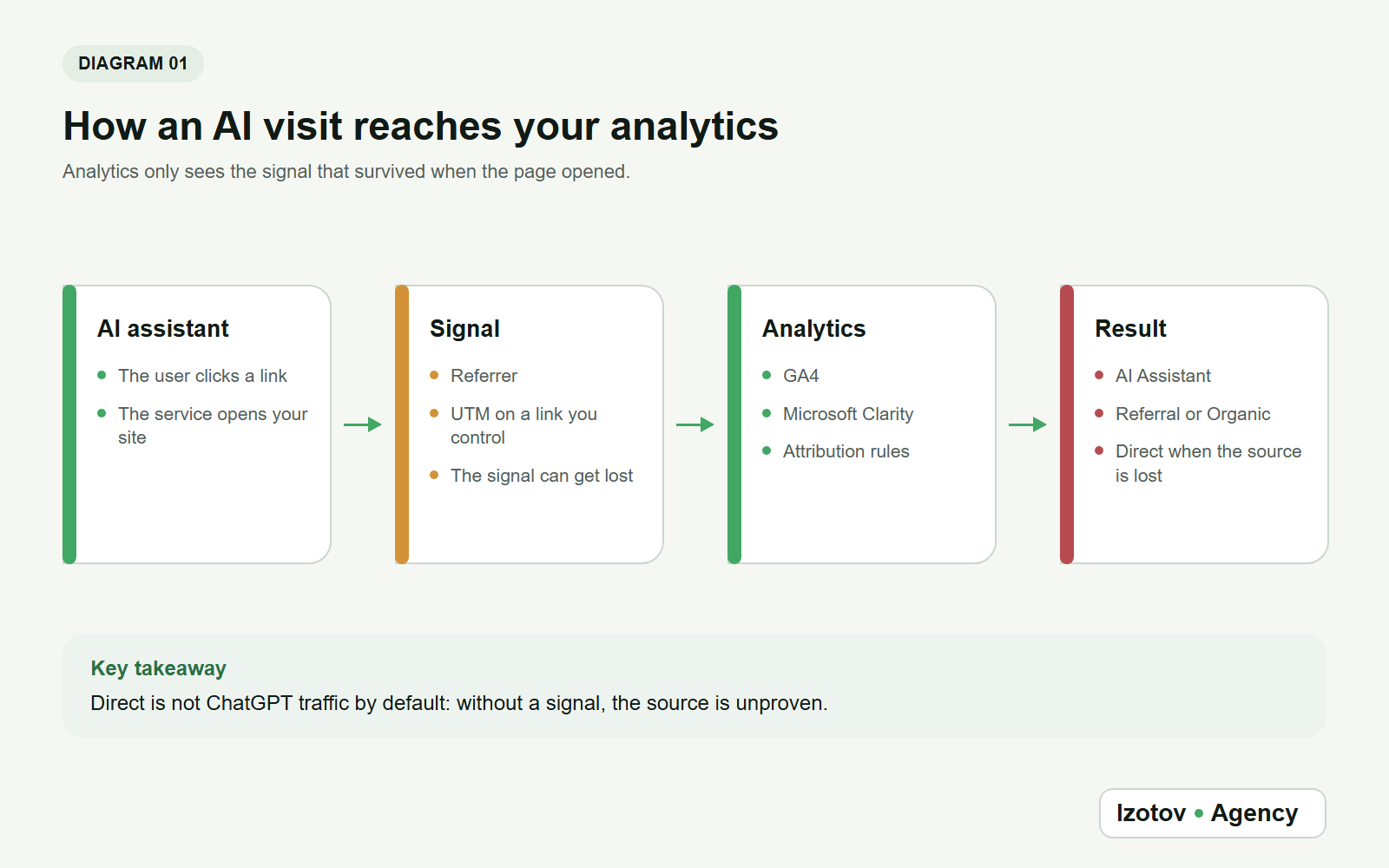
Figure 1. The source is set by the signal that survived, not by the analyst's guess
| Signal on the visit | Most likely channel | What you can claim |
|---|---|---|
| GA4 recognized the AI service domain | AI Assistant | The session belongs to a known AI source |
| The referrer survived, but the channel rule didn't match | Referral, with a specific source | There was a visit from that domain; the classification needs checking |
| The link has correct UTM tags | The source and medium you set | The source is known within the scenario you control |
| No referrer and no UTM | (direct) / (none) | The source is unknown; you cannot count the visit as AI traffic |
| The click came from Google AI Overviews or AI Mode | Organic Search | GA4 counts the visit as ordinary search traffic |
Not every click after an AI interaction lands in a separate AI channel. GA4 puts visits from AI Overviews and AI Mode in Organic Search. The same happens when a service opens the link through a search domain or does not pass its own referrer. What Google counts on its own side of the same visit is in my piece on how to get your site into Google AI Mode.
Step 1. Check the built-in AI Assistant channel in GA4
On May 13, 2026, Google Analytics added an AI Assistant channel to the default channel group. It collects recognized visits from AI services; Google's examples are ChatGPT, Gemini, DeepSeek, Copilot and Grok. So older guides that tell you to look for ChatGPT traffic only in Referral are now incomplete.
Open GA4 and do the following:
- Go to Reports.
- Open Acquisition and choose the Traffic acquisition report.
- Keep the default primary dimension, Session default channel group.
- Find the AI Assistant row.
- Set a date range in which AI visits could already have happened.
If the row is missing, that does not prove there were no AI visits. The site may get too few of them, the source may have been lost, or a particular domain is not yet covered by the channel rule. In that case, move on to checking session sources.
How do you check a specific source and landing page?
Add the secondary dimension Session source / medium. It shows which service sent the traffic inside the channel. For a spot check, filter by session source and look for specific values such as chatgpt.com, perplexity.ai or gemini.google.com. Recognized visits carry the medium ai-assistant: GA4 sets it when the referrer matches its list of AI assistants.
Then add the landing page. Depending on the report setup, this is Landing page + query string or a similar page dimension. If the standard report cannot give you a convenient breakdown, build an exploration with these fields:
- Session default channel group
- Session source / medium
- Landing page + query string
- Sessions
- Engaged sessions
- Key events
- Revenue, if it is tracked correctly
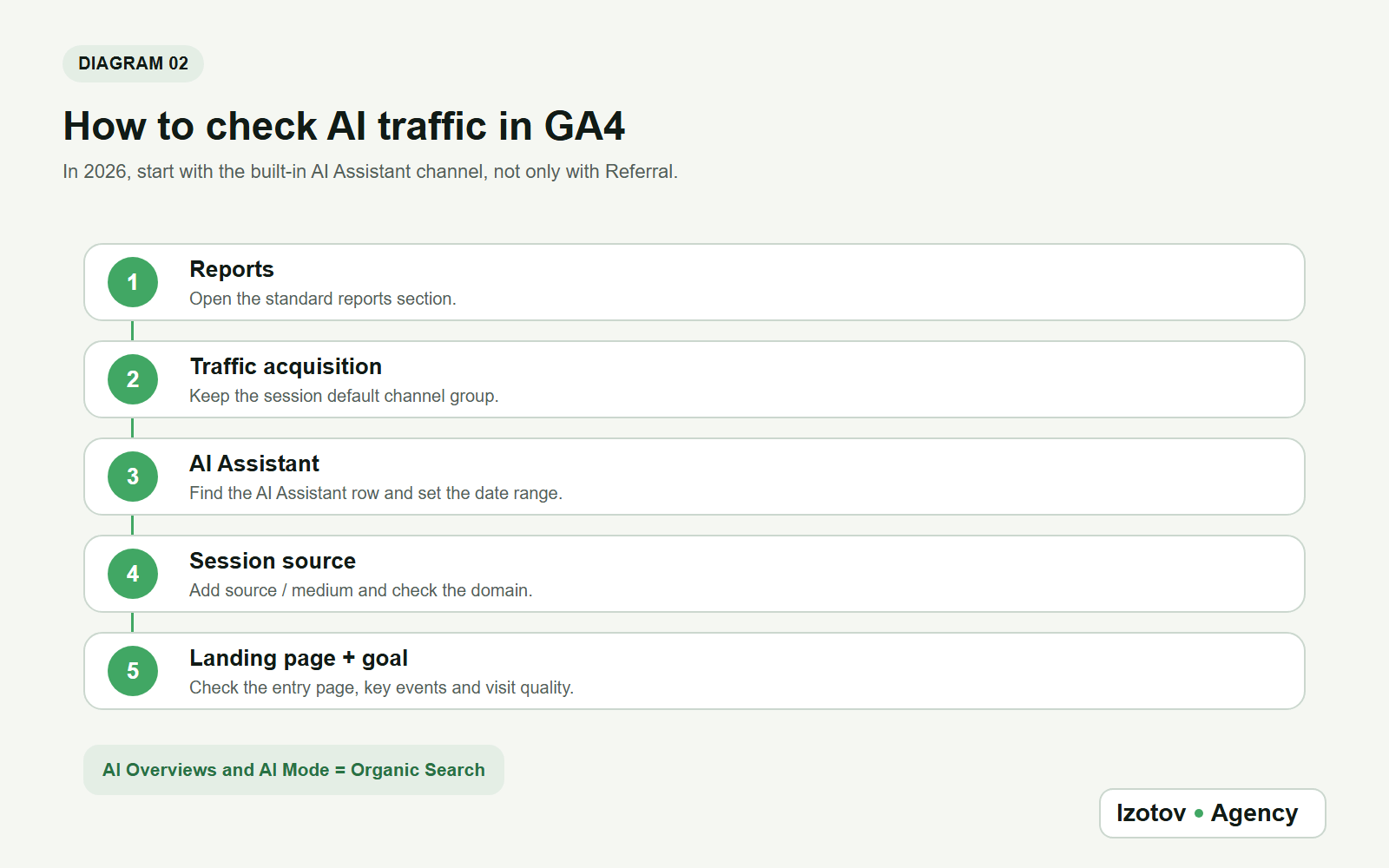
Figure 2. In GA4, the check starts with the built-in AI Assistant channel
Look at the channel first, then the source, the landing page and what the visit led to. This order keeps you from mistaking one domain for all AI traffic, and from stopping at a session count without knowing which pages brought people to the site.
Do you need a custom channel group in GA4?
GA4 lets you create custom channel groups. Until May 2026, that was the main way to collect AI sources in one report. Now a custom group is an extra: use it when you find a confirmed domain that the built-in channel misses, or when you want a specific set of services in your internal reports.
Don't start with a broad regular expression on words like ai, openai, google, bing or x. It will easily pull in ordinary search, social networks and irrelevant referrals. It is safer to add exact domains one at a time, after checking each row in the raw data. Place your custom channel above Referral: GA4 puts traffic into the first channel whose definition it matches.
To change channel groups, you need the Editor role or higher on the property, and a standard property allows two custom groups. Custom groups apply to your reports retroactively, but they cannot restore a referrer that never arrived with the visit.
Step 2. Find AI visits in Microsoft Clarity
GA4 is not the only free tool with an AI channel. Microsoft Clarity, which many sites already run for session recordings and heatmaps, has two: AIPlatform for clicks on organic links in AI chat answers and PaidAIPlatform for clicks on ads inside AI chats. Clarity lists ChatGPT, Claude, Gemini, Copilot and Perplexity as supported sources.
- Sign in to Clarity and open your project dashboard.
- Go to the Referrer card.
- Switch to the Channels tab and find AIPlatform and PaidAIPlatform.
- Select a channel to filter the dashboard, recordings and heatmaps by it.
- Compare engagement with other channels and download the data if you need it.
- Add the AI segment to your Watchlist, so the next check looks the same.
Clarity also classifies these visits by known referral patterns. If the source is hidden, the visit shows up as Direct. Data from before the feature launched is not reclassified.
What does Clarity add to GA4?
Clarity counts only visits from the standalone AI apps, such as chatgpt.com or copilot.microsoft.com. AI features built into search engines and office tools are left out, and GA4 keeps its own list of AI assistants. So the two channels will not match one to one, and they are not meant to.
Where Clarity helps is behavior. From the AIPlatform channel, you can open recordings of real AI-referred sessions and heatmaps of their landing pages: where people who came from an AI answer scroll, what they click and where they leave. A single visit from an unexpected domain with almost no time on the page is not a quality visit yet. It can be a technical open, a link preview or a very short human visit.
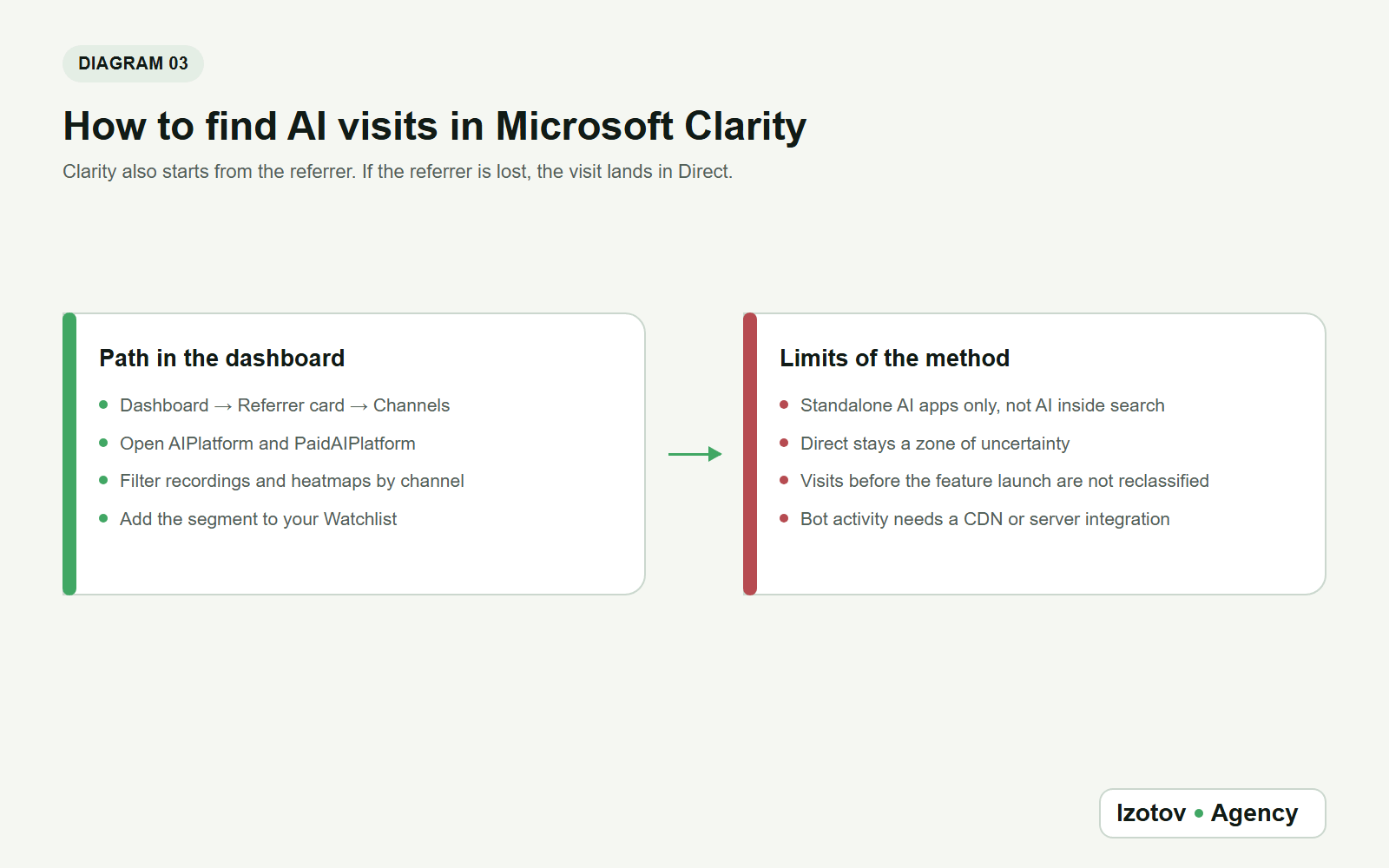
Figure 3. In Clarity, AI visits have their own channels, with recordings and heatmaps behind them
What about clicks from AI Overviews and AI Mode?
If someone clicks a link inside an AI answer on a search results page, the visit usually mixes with ordinary search traffic. GA4 puts clicks from AI Overviews and AI Mode in Organic Search, and Clarity leaves AI inside search engines out of its AI channels. You cannot isolate these clicks by domain either: google.com and bing.com serve many different scenarios.
So don't build a segment that says every visit from google.com is AI. To separate them reliably, you need an extra signal that really is in the data: a special link parameter, a separate landing page in a controlled experiment or another confirmed marker. Without one, leave the traffic in search and note the limitation in your report.
For the search side, use the search engines' own reports. The generative AI performance report in Search Console counts impressions of your links in AI Overviews and AI Mode, and the AI Performance report in Bing Webmaster Tools shows how often your pages are cited in Copilot and AI summaries in Bing. Both describe visibility in answers, not visits, so keep them next to your analytics rather than inside it.
Which AI assistant domains should you check?
A domain list is a working filter, not a fixed rule. One service can use several domains, change its redirects or open links in a built-in browser. On top of that, GA4 may normalize a source differently from the raw referrer you see in other tools.
| Service | Values to check first | Note |
|---|---|---|
| ChatGPT | chatgpt.com, chat.openai.com | The second domain matters for older periods and saved links |
| Gemini | gemini.google.com | Don't mix it with the whole Google domain |
| Perplexity | perplexity.ai | Check subdomain variants in your own data |
| Claude | claude.ai | Count only confirmed human visits |
| Microsoft Copilot | copilot.microsoft.com | Don't include all of microsoft.com or bing.com |
| Grok | grok.com | Don't include all traffic from X |
| DeepSeek | chat.deepseek.com | Check the actual source or referrer before adding it |
Once a month, export new sources, look for unfamiliar domains and check them by hand. If a new AI service really did send a visit, add it to your saved segment and note the date of the change. That keeps the list verifiable, and your historical report doesn't turn into an opaque regular expression.
When do UTM tags actually help?
UTM tags answer the question only when you control the link. Good examples: your own chatbot, a company GPT, a partner integration, a prompt library on your domain or a link your team deliberately shares in an AI channel. Then you can agree on values such as utm_source=corporate_ai, utm_medium=assistant and a clear campaign name.
In ordinary answers from public ChatGPT, you don't control the link, so advice like "add UTM tags to every link from AI" can't be followed. Tags won't appear on an already published URL by themselves either. Some services tag their own links: ChatGPT often adds utm_source=chatgpt.com. That tag belongs to the service, appears on some clicks and not others, and you cannot change it.
Keep the case consistent. UTM values are case-sensitive, so ChatGPT, chatgpt and CHATGPT can end up in separate rows. Keep a dictionary of your tags and don't put a service name into different fields without a reason.
Why does some AI traffic land in Direct?
(direct) / (none) means the tool didn't get enough of a source signal. Google names the usual reasons: links without UTM tags, redirects and URL shorteners that strip the source, addresses typed by hand, links in offline documents such as PDFs, and ad blockers. Visits from AI assistants can end up in the same group, but the report itself doesn't prove it.
You cannot subtract "normal Direct" and call the rest ChatGPT traffic. Even a sharp rise in direct visits to one article stays an indirect observation. You can compare it with the date the link appeared in AI answers, with server logs and with user behavior, but in the final report, label that volume as unconfirmed.
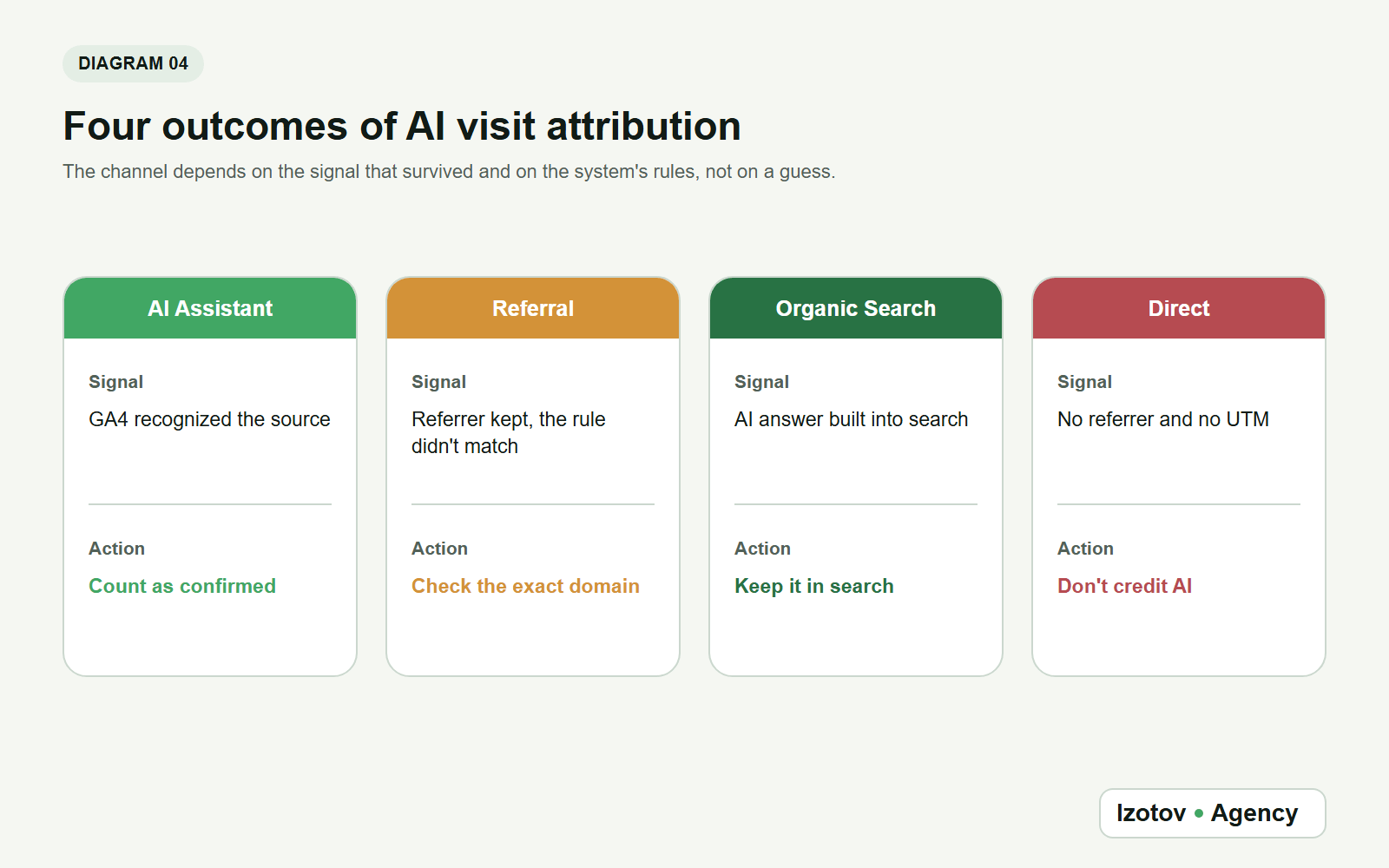
Figure 4. Confirmed AI traffic, search, Referral and Direct should not be merged into one group
Keep confirmed AI traffic in its own segment, leave AI search clicks in Organic Search and don't redistribute Direct without an extra signal. The number will be smaller than you hoped, but you can back it up.
How do you tell a human visit from a bot request?
An AI crawler loads pages to collect or refresh data. A person opens the page in a browser, reads it and may take an action. Don't add these two up into one metric.
GA4 automatically excludes known bots and spiders, using Google's research and the IAB International Spiders and Bots List. You can't turn this off, and you can't see how much was excluded. Clarity has a separate Bot Activity dashboard under AI Visibility: once you connect a supported CDN or server, it shows which AI operators request your pages and how often. Server logs add one more layer: user agent, IP address, request rate and the URLs requested.
If you want to check citability or AI bot access, analyze the logs on their own. If you want to measure marketing impact, use human sessions only. A crawler visiting a page confirms neither a brand mention nor a click. I check AI crawler access and response codes in the logs as part of technical GEO.
How do you judge the quality of AI traffic?
A session count without context says little. A small stream of visits to a service page can bring more inquiries than a large stream to a reference article. Compare the AI segment with organic search and referral traffic, but keep the purpose of each landing page in mind.
The minimum set of metrics:
- Sessions
- Users
- Landing pages
- Engaged sessions and engagement rate in GA4
- Engagement time
- Key events in GA4
- Clicks through to commercial pages
- Leads and revenue, if ecommerce is tracked correctly
First, find out which pages bring people in. Then check what visitors do after they land. For an informational article, a useful result can be a click to a related guide, a view of a service page or a return visit later through a branded search. That last path won't always keep the original AI source, so don't promise full end-to-end attribution.
Don't draw conclusions from percentages on a small sample. One lead from two visits makes an impressive 50 percent, but it is not a pattern. Show absolute numbers, the period and the segment size next to every rate.
Why do GA4 and Clarity show different numbers?
Don't expect a perfect match. GA4 works with its own sessions and channel rules, while Clarity keeps its own list of AI sources and leaves out AI inside search engines. The time zone, filters, analytics consent, ad blockers, the order in which tags load and session length all affect the result.
To reconcile the two sensibly:
- Use the same dates and time zone.
- Compare the GA4 session source with the referrer in Clarity.
- Use the same verified list of domains.
- Show the built-in GA4 channel and your manual domain segment separately.
- Compare landing pages, not just totals.
- Write down the differences in rules, and don't adjust one tool "until it matches" the other.
A difference is not an error in itself. The error is counting AI Assistant in one report and all of Referral, or all traffic from a search domain, in the other. Align the segment definitions first, then analyze the gap.
Monthly analytics checklist
It helps to run the check on the same day each month and keep a short change log.
- Update the date range in GA4 and Clarity.
- Record sessions in the built-in AI Assistant channel in GA4.
- Check source / medium and any new domains among your sources.
- Update your custom channel group if a new confirmed source appeared.
- Compare landing pages, key events and conversions.
- Look at Direct only as a zone of uncertainty, without adding it to AI traffic.
- Check bot activity and server logs separately from human visits.
- Write down the date of every change to rules, domains and the UTM dictionary.
- Save an export with absolute numbers and the sample size.
This log is especially useful now, while analytics tools keep changing how they classify traffic. The built-in AI channel in GA4, for example, changed where the analysis starts.
Common mistakes
Don't try to get an exact total where part of the sources is technically never passed on. It is better to show the confirmed segment and describe the zone of uncertainty separately. Broad filters on google.com, bing.com or the word ai won't solve the problem: ordinary search and unrelated sites end up in the sample.
UTM tags only help on links you control. They don't restore attribution for URLs that an AI assistant picked and built itself. And a request from an AI crawler shouldn't be counted as a visit from a potential customer.
Finally, don't stop at volume. Landing pages, engagement and goals show whether the site answers the visitor's task and whether AI traffic leads to useful actions.
If you'd rather not set up these reports and segments yourself, book AI visibility monitoring with Izotov Agency. I'll put AI visits into their own analytics segment, run the same questions through AI systems every month and match brand mentions with real visits and inquiries.
Frequently asked questions
Can you see all traffic from ChatGPT?
No. Analytics only sees visits that came with a usable signal. If the referrer or UTM tags are missing, the visit can land in Direct. So a report on confirmed sources is a lower bound, not the full volume.
Where do you find ChatGPT in GA4?
Start with the Traffic acquisition report and the AI Assistant row in the session default channel group. Then add session source / medium and the landing page. Check Referral as an extra layer for domains the channel doesn't recognize.
Why didn't a click from AI Overviews land in AI Assistant?
GA4 counts clicks from Google AI Overviews and AI Mode as Organic Search. That is the official channel rule, so you cannot look for these visits only in a separate AI group.
How do you find ChatGPT visits in Microsoft Clarity?
Open the Referrer card on your dashboard, switch to the Channels tab and select AIPlatform. Filter recordings and heatmaps by that channel and add it to your Watchlist. If the referrer was lost, Clarity shows the visit as Direct.
Should you add UTM tags for ChatGPT?
Only if you control the specific link, for example in your own bot or a company assistant. For ordinary links that a public AI service generates itself, you can't.
Can you count growth in Direct as a result of AI optimization?
Not without an extra signal. The growth may coincide with your site appearing in AI answers, but Direct combines many reasons for a lost source. Treat it as a hypothesis, not as a confirmed volume of AI traffic.
Which matters more: visits or conversions?
Look at both. Volume shows scale, while landing pages, engagement and goal completions show value. On a small sample, always show absolute numbers next to percentages.
Sources
- Default channel group, Analytics Help.
- What's new in Google Analytics, Analytics Help.
- GA4 Traffic acquisition report, Analytics Help.
- Custom channel groups, Analytics Help.
- GA4: Understand (direct) / (none) traffic, Analytics Help.
- Known bot-traffic exclusion, Analytics Help.
- AIPlatform and PaidAIPlatform, Microsoft Clarity documentation.
- Bot Activity overview, Microsoft Clarity documentation.
- Generative AI performance report (Search), Search Console Help.
- AI Performance in Bing Webmaster Tools, Bing Webmaster Tools Help.