
A single question with your company's name in it shows what an AI system can say about you. It does not show how visible your brand is in AI answers. To measure that, you need a set of prompts chosen in advance, the same conditions for every check, several repeat runs and a log that keeps the full answers. Only then can you calculate the share of mentions, recommendations, citations and AI share of voice.
Below is the protocol I use for ChatGPT, Gemini and Microsoft Copilot. You can run it by hand in a spreadsheet and then repeat it on the same prompt set. I checked the interfaces, feature names and webmaster reports described here against the official help pages on September 19, 2026.
What is brand visibility in AI answers?
AI visibility describes how a brand is represented when AI systems answer relevant questions from real users. Whether the model holds some record of the company somewhere in its data is not the point. What you observe are specific answers: is the brand named, is it recommended, in what context does it come up, which websites are shown as sources, and does the answer get any facts wrong?
The unit of observation is one answer to a prompt you wrote down in advance, under known conditions. Forty prompts run three times each in one system give up to 120 observations. Some answers may turn out invalid: the service refuses to answer, the task needs a different mode, or the result has nothing to do with the category you are checking. Decide how you will exclude such answers before you calculate any percentages.
One answer is still one observation. On a repeat run, the system may change its list of brands, pick up context from the chat or apply the account's personalization. So a claim like "we rank second in ChatGPT" explains almost nothing without the prompt, date, mode and number of runs.
How do a mention, a recommendation, order and a citation differ?
These four events are often merged into one number, although each answers a different question.
| Event | What you record | Unit | Illustrative example |
|---|---|---|---|
| Mention | The brand name appears in the answer | Yes or no for each answer | The company is named among possible vendors |
| Recommendation | The system suggests considering the brand for the task | Yes or no, plus the context | The brand is on a list of suitable agencies |
| Order | Where the brand is first named among the brands compared | A number within this answer only | The brand is named third in one list |
| Citation | The company's domain is listed among the sources | Yes or no, plus the specific URL | The answer links to an article on the site |
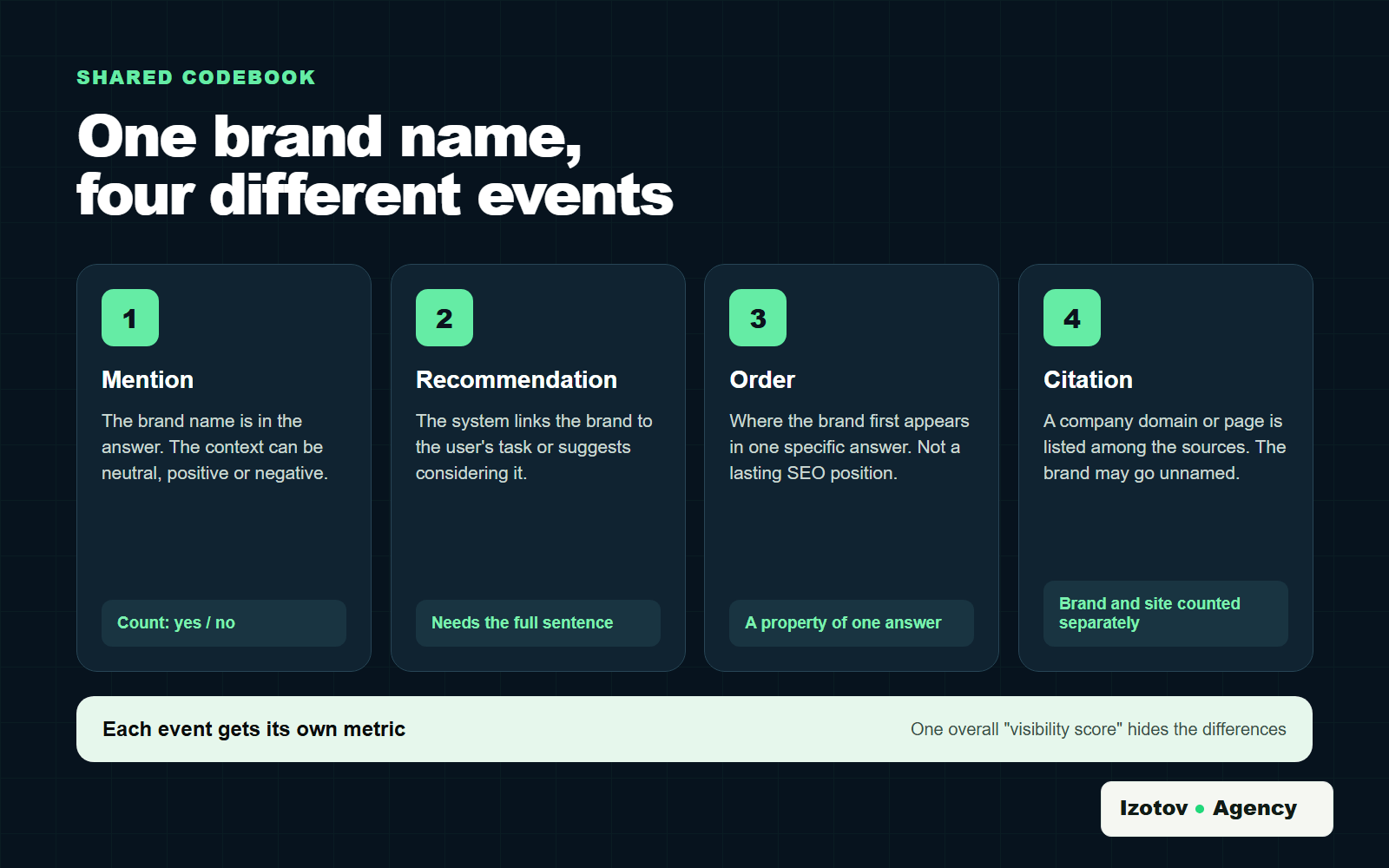
Figure 1. A mention, a recommendation, order and a citation each need their own rules and metrics
A brand can be mentioned without being recommended. A site can serve as a source for an answer that never names the company in the text. And the order of brands in one answer cannot be carried over to the whole platform: it belongs to that single result and is not a stable position like a ranking in search.
How do you build the prompt set?
Start with the tasks your buyers are trying to solve, and pick the tools for checking only after that. If every prompt contains your company name, the result will be predictably inflated. Such a set works for checking facts about the brand but says little about whether the company shows up in answers to unbranded questions.
Split the prompts by scenario:
| Scenario | What it checks | Example prompt |
|---|---|---|
| Category | Whether the brand makes it into the set of options | Which agencies help a website show up in AI answers? |
| Recommendation | Whether the system suggests the brand for a task | Who should I hire for an AI visibility audit? |
| Comparison | Which criteria and companies appear side by side | Compare agencies that monitor brand mentions in AI answers |
| Problem | Whether the system sees the brand's service as the solution | What should I do if ChatGPT never recommends my company? |
| Local or industry | Whether visibility holds once the niche is narrowed | Who helps B2B companies get visible in AI search? |
| Brand | Whether the system describes the company correctly | What does [brand name] do? |
| Reputation | What context the brand is associated with | What is the reputation of [brand name]? |
For each important service, prepare several natural phrasings. They should differ in the task or the context, not in the order of two words. "Who should I choose," "who can help me fix this problem" and "compare the options" can trigger different kinds of answers. Ten nearly identical prompts create the illusion of a large sample when in substance they are one question.
Fix the list of competitors in advance too. Otherwise it is tempting to compare yourself only with companies that already showed up in a favorable answer. Also write down every spelling of the brand, the domain, common abbreviations and likely misspellings. You will need them when you code the answers.
Which conditions should you record?
An answer depends on more than the text of the prompt. Your log needs:
- the platform and the mode used;
- the date and time of the check;
- the language of the prompt and the answer;
- the country or city, if the service takes location into account;
- signed-in or signed-out use;
- whether personalization and memory are on;
- a new chat or a continued conversation;
- the exact text of the prompt;
- the run number;
- the full answer and the sources shown.
Record the model name if the interface shows it and lets you choose. That will not make the answers deterministic. It does let you run the next check under comparable conditions and explain why two samples differ.
How do you run a repeatable measurement?
First, freeze the prompt list, the competitor list and the coding rules. Once the series has started, do not swap an awkward question for one that performs better, or the start and the end of the sample will be measuring different tasks.
In practice, the order looks like this:
- Open a clean chat and set the account options you need.
- Enter the first prompt with no extra hints.
- Save the full answer, the source links and the date.
- Mark the mention, recommendation, order, citation, sentiment and errors using one shared codebook.
- Repeat the prompt the chosen number of times. Use the same number of runs for every brand and platform you compare.
- Move on to the next prompt.
- When the series is finished, review the disputed rows by hand, and only then calculate the metrics.
A log row can hold the prompt ID, platform, mode, date, account, personalization, location, run number, answer validity, brands mentioned, first brand named, recommendation, sources, sentiment, factual errors and a link to the saved full answer.
Do not settle for a screenshot of the flattering fragment. Without the full answer you lose the context of the recommendation, and without the raw observations nobody can check the final percentage. Keep raw answers in separate files and put a link or file ID in the spreadsheet.
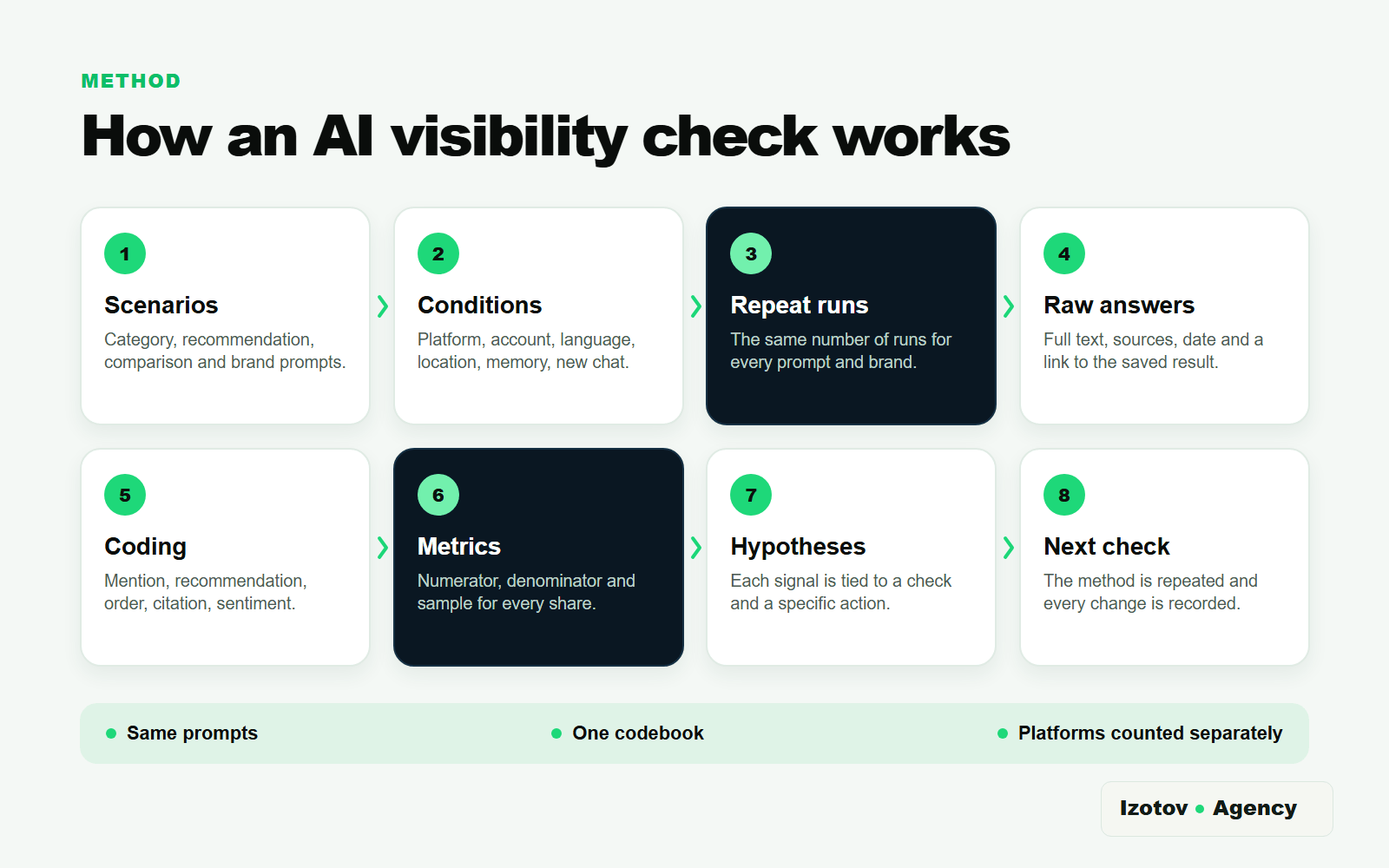
Figure 2. A repeatable measurement connects scenarios, conditions, raw answers, coding and the next check
How do you code a disputed answer?
Before the first check, write a short codebook. It only needs to describe what counts as a mention, a recommendation, a positive or negative context and a material factual error. Add one made-up example to each rule. A document like this helps two editors score a phrase like "you could also consider company X" the same way, and keeps the criteria from shifting after you have seen the results.
If an answer can be read more than one way, mark it "needs review" and save the quote with its context. Disputed rows are best handled in a separate pass after the series is finished. Then add the decision to the codebook, so the same rule applies to the other platforms and competitors.
An invalid answer also needs an explicit reason. A refusal, a cut-off answer, an answer in the wrong language and a technical error are different from an answer where the brand is simply absent. If you log all of them as zero visibility, the denominator will be wrong.
When one answer names several companies, code each one separately. A competitor's mention does not cancel your brand's mention, but it does affect the competitive share. For a recommendation, save the whole sentence. Sometimes a brand name shows up in a warning, a criticism or a list of exclusions, and an automatic keyword search would log it as advice.
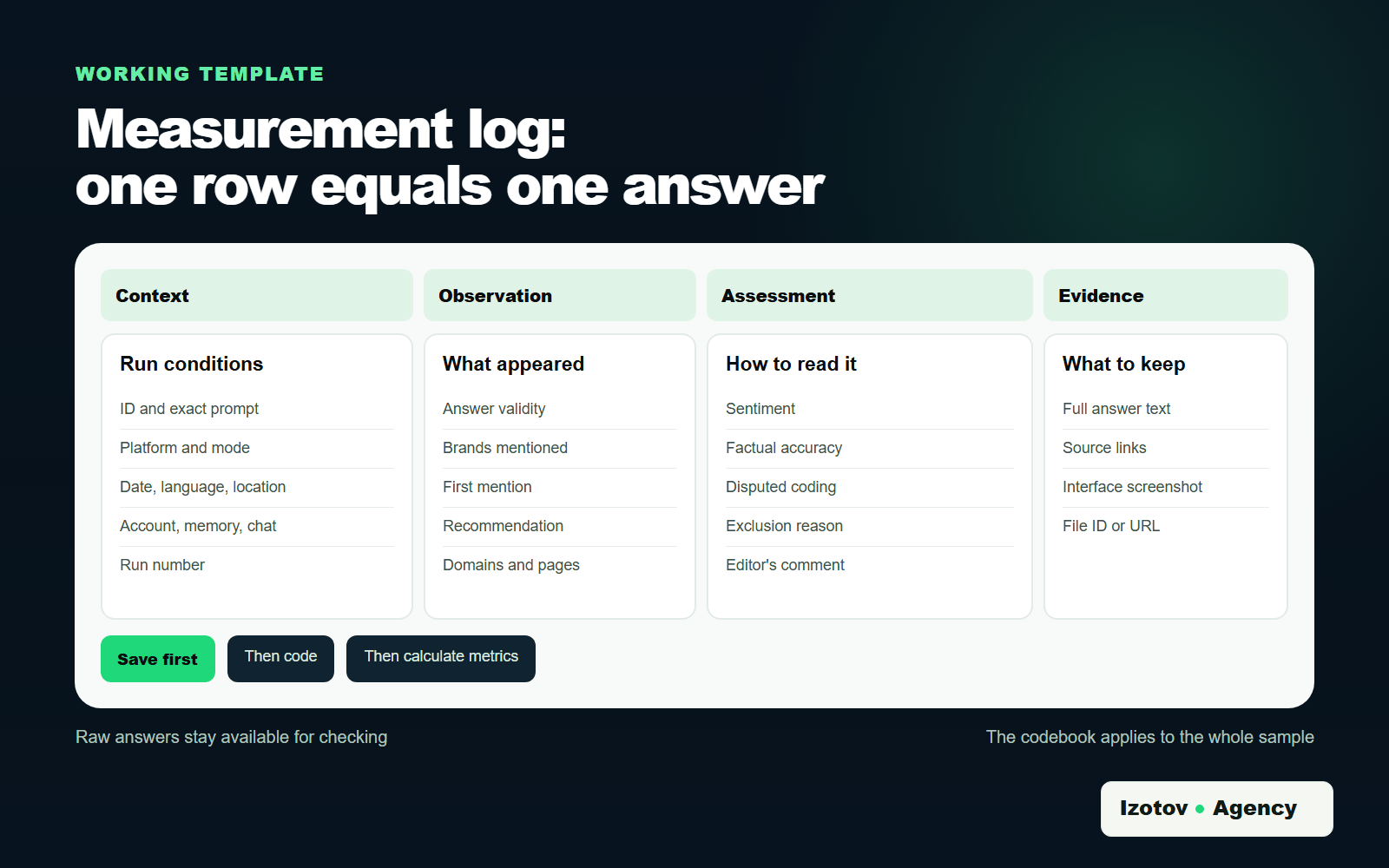
Figure 3. One log row corresponds to one answer under known conditions
Which metrics should you calculate?
A metric is useful only together with its numerator, denominator and sampling rules. A label like "visibility: 38%" does not tell anyone what was measured.
| Metric | How to calculate | What it shows | Limitation |
|---|---|---|---|
| Mention rate | Answers naming the brand / all valid answers × 100% | How often the brand appears in the sample | Depends on the prompt set |
| Recommendation rate | Answers recommending the brand / all valid answers × 100% | How often the brand is suggested | Needs one agreed definition of a recommendation |
| First-mention rate | Answers where the brand is named first / answers with a list of the brands compared × 100% | How often the brand leads the list | It is not a stable position |
| Domain citation rate | Answers linking to the domain / valid answers that show sources × 100% | How often the site is a source | Not the same as a brand mention |
| Sentiment | Counts of positive, neutral and negative contexts | How the brand is described | Needs rules for manual coding |
| Accuracy | Answers without a material error / checked answers about the brand × 100% | How correct the information is | Needs a verified fact sheet |
For sentiment, define the boundaries of each class in advance. A neutral listing of a service should not be logged as positive. For accuracy, a short fact sheet helps: the correct name, services, service area, contacts, limitations and anything else you can confirm on the website or in company documents.
The summary table should stay linked to the source rows. Next to each percentage, give the count of events and the size of the valid sample, for example 12 mentions out of 40 answers. That makes the math easy to check and keeps small samples from looking more convincing than they are. When you compare periods, note every change in the method, even if only one prompt changed.
Order of mention is best kept as a distribution: how many times the brand came first, second and further down. An average "position" hides the answers where the brand did not appear at all, so always show the share of answers with the brand next to it.
How do you calculate AI share of voice?
There is no single formula for AI share of voice that fits every task. Name the version you used in the report.
The first version describes coverage of the prompt set:
AI share of voice by prompt = prompts where the brand is mentioned / all prompts with a valid answer × 100%.
If the brand came up in 10 of 40 tracked prompts, the figure is 25%. The numbers are made up and only illustrate the calculation.
The second version compares several brands:
Competitive share of mentions = mentions of the brand / mentions of all brands compared × 100%.
If your brand got 12 mentions and the whole predefined set of brands, yours included, got 60, the competitive share is 20%. Do not call this market share. It applies to specific prompts, platforms, a period and counting rules.
Bing Webmaster Tools has a share metric of its own. Citation Share, in preview since June 2026, is the percentage of citations attributed to your site out of all citations shown for one grounding query, the phrase the AI used to retrieve sources. It measures your domain as a source and does not name the other sites. Do not carry that formula over to ChatGPT, Gemini or brand mentions without a link.
How do you check your brand in ChatGPT?
To check brand visibility in ChatGPT, run the same prompt set in new chats and note separately whether web search was used. According to OpenAI's help center, ChatGPT may search the web on its own when a question would benefit from current information, or the user can pick Search from the tools. Answers that used search may include citations and a Sources panel with the cited sources and other relevant links.
For each run, save:
- the full answer;
- the brands mentioned and the order in which they first appear;
- the wording of the recommendation;
- the cited domains and specific pages;
- factual errors;
- whether Search was used;
- the state of memory and the approximate location, if they could have shaped the context.
OpenAI says that when ChatGPT search uses outside search providers, it typically rewrites the user's prompt into one or more targeted queries for them. It may use a general location based on the IP address and, if memory is on, relevant saved memories when it rewrites a query. People who are not signed in can use web search too, so record whether you were signed in. OpenAI also warns that search results and citations can be incomplete, outdated or incorrect, and suggests opening the cited source to check it.
The practical rule follows from this: monitor brand mentions in ChatGPT in the same account mode every time. For the baseline, a new chat without extra context is the most convenient. Measure the personalized mode as a separate series if it matters for how your buyers really use ChatGPT. Record the brand's order for that answer only, and never call it the brand's permanent position in ChatGPT.
How do you check your brand in Gemini?
Gemini follows the same basic protocol: a new chat, a fixed prompt, the full answer, repeat runs and the same coding rules. In addition, record whether the Sources button appeared, which links were shown and whether the account was personalized.
Google's Gemini help says that not every response includes sources or related links, and that without a Sources button Gemini provided no links for that particular response. So log a missing Sources button as a property of that answer. On its own, it does not show what information the answer drew on, and it does not justify setting your domain's citation rate to zero for the whole platform.
Personalization in Gemini can draw on past chats, connected Google apps and your instructions for how Gemini should respond. Google notes that these features are not available to everyone and work only with a personal Google Account, not with a work, school or supervised one. For a comparable check of brand recommendations in Gemini, pick one mode and keep it for the whole series. If the business needs to see the personalized scenario, run a second series and label it separately.
When coding, keep recommendations apart from mentions. "Brand X is among the well-known companies" is not yet advice to contact it. A recommendation is an answer where the system ties the brand to the user's task or directly suggests considering it. The criterion must stay the same for every competitor.
How do you check your brand and site in Copilot?
In Microsoft Copilot there are two separate things to observe. A manual series shows whether the brand is mentioned and in what context. The AI Performance report in Bing Webmaster Tools measures how often pages from your verified site are cited as sources in Copilot, AI summaries in Bing and select partner integrations.
For the manual series, ask the same category, recommendation and comparison questions as in the other systems, signed in with a personal Microsoft account. Save the main answer, brand mentions, order, context, errors and sources. According to Microsoft's Transparency Note for Copilot, Copilot decides for each request whether it needs data from the web, and when a text answer is grounded in web search, hyperlinked citations are listed below it. Microsoft also warns that Copilot can make mistakes and can misrepresent content even from authoritative web sources.
Several Copilot settings change what you see, so record them in the log. In Copilot's privacy controls, web search, saved memories and a shared experience with Bing, Edge and MSN are separate toggles. Microsoft released a new version of the Copilot app on August 18, 2026, and its help pages describe the old and new versions separately, so note which one you tested.
If you own a verified site, Bing Webmaster Tools has an AI Performance report, launched in public preview in February 2026. It covers Microsoft Copilot, AI summaries in Bing and select partner integrations. As of my check, it shows:
- total citations: how many times your content was shown as a source in AI answers;
- cited pages: how many unique pages were cited per day, and citation counts for each URL;
- grounding queries: the short phrases the AI used to retrieve the content it cited, grouped by Bing rather than shown as user prompts;
- a timeline for 7 days, 30 days, 3 months or a custom range, refreshed daily, with export to CSV and Excel;
- in preview since June 2026: intents, topics, Citation Share and a comparison with an earlier period.
The report has clear limits. Microsoft says the data is sampled and aggregated, very low citation activity may not show up at all, and grounding queries are not the questions users typed. A citation is not a click. The report counts your pages as sources and does not show whether Copilot named your brand in the text or recommended it. So it does not replace a check of your brand across buyer scenarios. It answers a narrower question: how often pages from one domain are cited in Copilot, Bing and partner AI answers.
What does Google Search Console show for AI Overviews and AI Mode?
Google now has a similar report. The generative AI performance report in Search Console, announced in June 2026 and rolled out to all websites as of August 31, 2026, counts impressions: how many times links to your site were shown in AI Overviews and AI Mode. It groups them by page, country, device and date. Neither the announcement nor the help page lists queries among the dimensions, and the Gemini app is not among the features it covers. The same impressions are still part of the regular Performance report under the Web search type.
| What you compare | Manual brand check | Bing Webmaster Tools AI Performance | Search Console generative AI report |
|---|---|---|---|
| What it records | Brand name, recommendation, sentiment and errors | Your pages cited as sources | Impressions of links to your site |
| Prompts | Your own prompt set | Grounding queries, grouped by Bing | No query dimension listed |
| Coverage | Any platform, under one protocol | Copilot, AI summaries in Bing, select partners | AI Overviews and AI Mode |
| Effort and data | Your own repeat runs and log | Sampled data, refreshed daily | The usual Performance report limits apply |
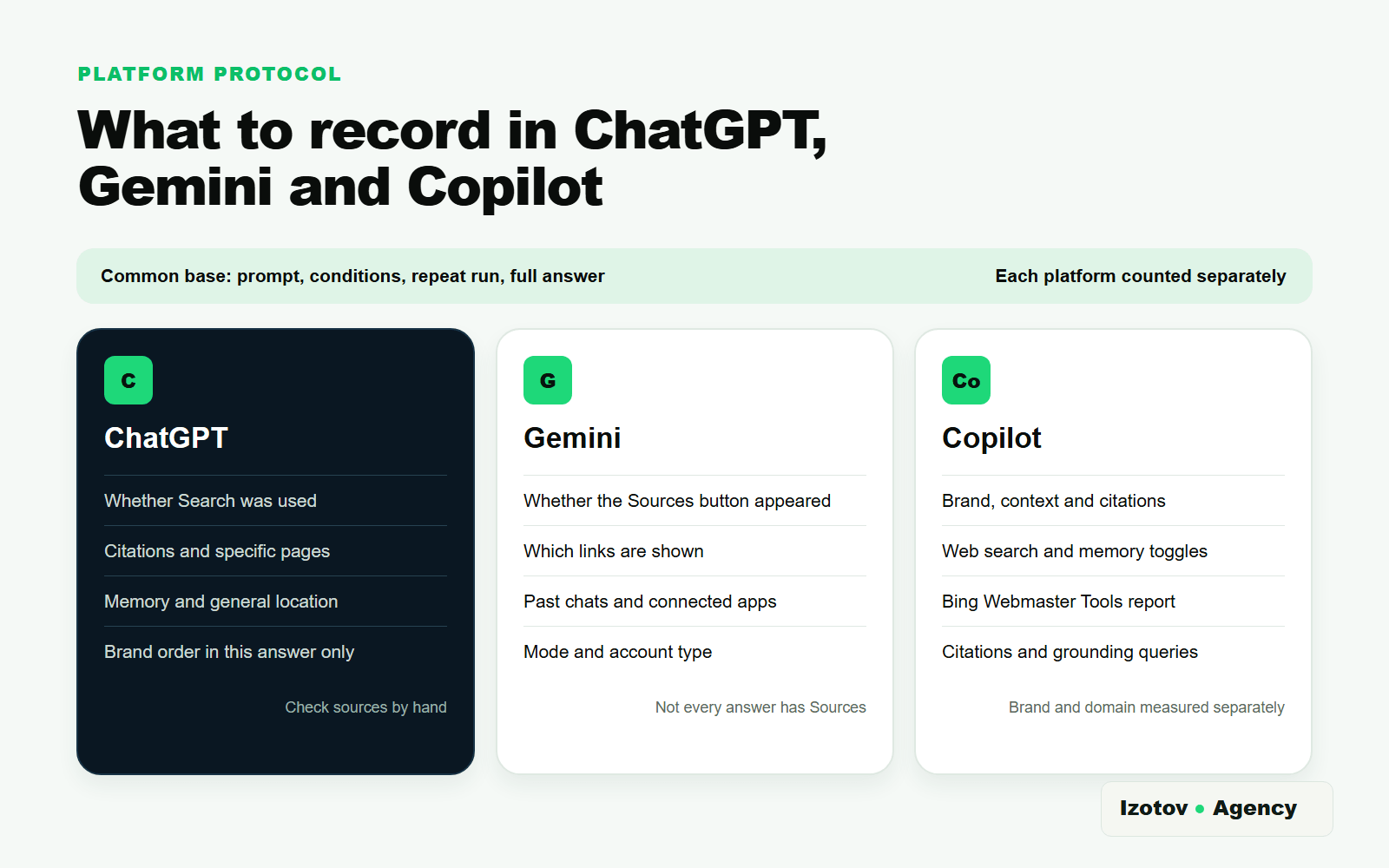
Figure 4. The method stays the same, but platform-specific signals are recorded separately
How do you compare your brand with competitors?
Comparing brands in AI answers only makes sense within one shared frame: the same prompt list, the same number of runs, the same period and the same rules for coding events. Calculate the results for ChatGPT, Gemini and Copilot separately first.
For each platform, the summary table can show the mention rate, recommendation rate, first-mention rate, domain citation rate, sentiment distribution and number of material factual errors. Put the sample size next to them. Without it, the gap between 40% and 50% looks large, even though it may come down to four answers versus five.
Do not change the competitor list after you have seen the results. If a system unexpectedly names a new player, put it under "other mentions" and decide before the next check whether it joins the control group. That keeps the historical data comparable.
Look at sources separately. If media, directories or review sites get cited often, that shows which types of pages feed the answers. It does not prove that a placement on a particular site will raise your visibility. Treat it as a hypothesis to test.
How do you interpret the results?
The final part of the report is a list of hypotheses you can test. A ranking of brands with no explanation of possible causes does little for the work ahead, and the same signal can have several explanations.
| Signal | Possible hypothesis | What to check | Action | Control |
|---|---|---|---|---|
| The brand is rarely mentioned | The pages answer category questions poorly | Topic coverage, indexing, external mentions | Improve the relevant pages and factual profiles | Repeat the same prompt series |
| The brand is mentioned but not recommended | The system knows the company but does not link it to a buying criterion | Services, evidence, comparisons, reviews and terms | Sharpen the positioning on the site and in external sources | Compare the recommendation rate |
| The site is cited without the brand name | The content is useful, but its link to the company is weak | Authorship, organization name, company pages | Make the link between the content and the brand explicit | Check citations and mentions separately |
| Answers contain factual errors | Available sources disagree | The site, directories, profiles and old publications | Fix the primary pages and align the data | Check the fact sheet in the next run |
| Sentiment got worse | New negative contexts appeared in the sample | The full answers and their sources | Work through the specific causes and sources | Compare the same scenarios |
A change after an update does not prove cause and effect either. Answers are affected by model updates, search results, personalization and the mix of sources. So tie each action to a control check, and keep every other condition as stable as you can.
How do you set up ongoing monitoring?
For the first baseline, a spreadsheet and a folder of raw answers are enough. This format forces you to define prompts, denominators and coding rules before you buy a tool. It works as long as you can check the number of platforms, brands and runs by hand without losing quality.
Automation starts to pay off when the matrix grows: dozens of scenarios, several countries, many competitors, three or more platforms, regular periods and several people responsible. A tracker should keep the full answer and the check conditions, not just show one overall score with no breakdown.
Minimum requirements for a monitoring system: prompt history, platforms kept separate, raw answers, sources, coding rules, configurable competitors, data export and a change log. Before you compare periods, check whether the prompts, modes or calculation method changed.
If you would rather not run these checks yourself, book an AI visibility audit with Izotov Agency. I agree a prompt set with you, run it in the AI systems that matter to your market, compare you with competitors and give you a 30–90 day plan. For regular measurements with the same method, there is monthly AI visibility monitoring with a progress report. If AI systems get facts about your company wrong, I trace the sources of those errors as part of AI reputation management. If competitors make the shortlists and you don't, I work on AI citation building.
A short checklist
- Define your services, audience, geography and competitor list.
- Collect unbranded scenarios and a separate block of brand checks.
- Fix the platform, mode, account, personalization, language and location.
- Choose the same number of runs everywhere and a rule for excluding invalid answers.
- Save full answers and sources before coding.
- Mark mentions, recommendations, order, citations, sentiment and errors.
- Calculate metrics with an explicit numerator and denominator.
- Compare competitors and periods only under the same conditions.
- Write down hypotheses, assign actions and set the date of the next check.
This gives you a baseline. The next report is useful if it repeats the same method and records every change separately.
Frequently asked questions
Can you check brand visibility with a single prompt?
No. One answer is one observation. A measurement needs different buyer scenarios, repeat runs and the same conditions.
What counts as a brand's position in ChatGPT or Gemini?
You can record where the brand is first mentioned in a specific answer. You cannot call it the brand's permanent position, because the next answer may change which brands are recommended and in what order.
Does a missing link mean the AI system does not know your site?
No. Whether sources are shown depends on the platform and on the specific answer. In Gemini, Sources do not appear every time. Count brand mentions and domain citations separately.
Does Bing Webmaster Tools replace an AI visibility audit?
No. The AI Performance report shows how often pages from your verified site are cited in Copilot, AI summaries in Bing and select partner integrations, based on sampled data. You cannot treat it as a report on ChatGPT or Gemini, and it does not record brand mentions without a link. The same goes for the Search Console report, which covers AI Overviews and AI Mode.
How often should you repeat the measurement?
Choose the interval based on how fast things change in the business and how much work is being done. What matters is that the prompts, platforms, rules and number of runs stay the same within the periods you compare. After a major site update, you can run a separate control check without mixing it into the regular series.
Sources
- Searching the web with ChatGPT, OpenAI Help Center.
- View related sources from Gemini Apps, Gemini Apps Help.
- Get personalization in Gemini Apps, Gemini Apps Help.
- Transparency Note for Microsoft Copilot (for individuals), Microsoft Support.
- Microsoft Copilot for individuals: your privacy controls and choices, Microsoft Support.
- AI Performance in Bing Webmaster Tools, Bing Webmaster Tools Help.
- Introducing AI Performance in Bing Webmaster Tools Public Preview, Bing Webmaster Blog, February 2026.
- New AI Visibility Insights in Bing Webmaster Tools: Intents, Topics, Citation Share, Compare, Bing Search Blog, June 2026.
- Generative AI performance report (Search), Search Console Help.
- AI features and your website, Google Search Central.